Your Instagram Stories deserve to shine, not blur. Blurry Instagram stories make your message hard to see and miss the impact you want. If your clips look foggy or pixelated, there’s a reason behind the haze, and we’ll uncover it.
Say goodbye to grainy uploads and hello to vibrant, sharp stories that grab attention every time. Let’s get into the real reasons you might ask Why does my Instagram Story look blurry? ” and ” How to keep every pixel crisp and clear.
At first consider that, if you want to save your favorite stories without losing quality, you can use our professional tool, ucmini Instagram Story Downloader, get and archive any story with just one click.
What Causes Blurry Instagram Stories? (4 Reasons)
When Instagram stories look blurry, it can be frustrating. Most issues come from Instagram’s handling of media, device limitations, camera choice, and app settings. Understanding these helps maintain better Instagram story quality.
Small tweaks, avoiding Instagram story upload compression, checking Data Saver Mode, enabling Upload at Highest Quality, or staying within Instagram’s size specs, can make your Stories crisp.
- Instagram’s compression algorithm: Instagram applies media compression to reduce file size. This compression algorithm simplifies areas in photos or videos, which can lower clarity, especially for large files or uploads over mobile data.
- Device-specific issues: Older phones or low-end cameras often capture lower resolution, and some Android devices show compression artifacts. Even sharp files can become blurry Instagram stories. Restored backups may also reduce clarity.
- Using the Instagram camera: The in-app camera compresses media before upload. For sharper Stories, use your phone’s native camera for higher-quality photos and videos.
- Instagram app settings: Settings like Data-saving Mode or turning off Upload at Highest Quality can lower clarity. Outdated app versions may cause glitches. Adjusting these ensures crisp, vibrant Stories.
Read more: If you want to make sure that your activities such as following, liking, or posting do not result in account restrictions, we invite you to read What Are the Instagram Limits in 2026 to learn about the latest Instagram rules and restrictions and always stay within safe limits.

How to Fix Blurry Stories on Instagram? (4 Proven Solutions for 2026)
Blurry and low-quality Instagram stories can make even your best content appear unprofessional, and poor Instagram story quality can discourage engagement.
These practical solutions address the main causes of low-quality uploads, helping you optimize your app settings, prepare content properly, improve capture techniques, and fix upload problems for crisp, engaging Stories in 2026.
- Optimize Your Instagram App Settings
Instagram applies aggressive video and image compression to keep uploads fast. This compression algorithm simplifies similar areas in photos or videos, which can lower clarity. Even high-quality visuals may become unclear in Instagram stories. To reduce the impact of Instagram story upload compression, follow a few key settings tips:
- Stay within size limits: Use images under 30MB and videos under 4GB to avoid excessive compression during upload.
- Prefer Wi-Fi over mobile data: Uploading via mobile data can activate stronger compression to save bandwidth.
- Export in optimal quality: Before posting, export your media at 1080*1920 resolution and high bit rate to preserve detail.
- Avoid multiple edits: Re-saving or re-exporting files repeatedly can compound compression, reducing clarity before upload.

2. Prepare Your Content Properly Before Uploading
Quality starts before you hit upload. Many blurry Instagram stories happen because the original files aren’t optimized for the platform.
When your media doesn’t follow Instagram’s size specs, the system automatically applies Instagram story compression, which lowers sharpness and detail. To keep your stories crisp and clear, prepare them carefully before uploading by following these essential tips:
- Use the right dimensions: Match Instagram story dimensions (1080*1920 px). Smaller or stretched files are auto-resized, causing compressed Instagram stories.
- Keep key visuals centred: Place text, stickers, and main elements away from edges to avoid cropping or distortion.
- Choose proper file formats: Use JPEG/PNG for images and MP4 for videos. PNG keeps graphics sharp, and MP4 reduces content compression.
- Optimize file size: Large files trigger Instagram’s upload compression algorithm, reducing clarity. Stick to 30-60 fps, H.264 codec with AAC audio, 3.5-5 Mbps bitrate, and 72 PPI for crisp visuals.
3. Use Better Capture Techniques
Even if your settings are correct, the way you capture content directly impacts its clarity. Poor lighting, digital zoom, or using the wrong camera can all make your videos and photos appear dull or grainy. Follow these steps to capture high-quality visuals and prevent pixelated Instagram stories.
- Use your phone’s native camera: Built-in cameras capture sharper images than Instagram’s in-app camera, which compresses files. iPhone cameras reach 12 MP; Instagram’s camera averages 3 MP.
- Improve lighting and focus: Face natural light, use reflectors, and keep the lens clean for sharp, vibrant results.
- Avoid digital zoom: Digital zoom reduces quality. Move closer and upload a clean version first to avoid extra compression.
- Adjust camera settings for best results: Record in 4K at 30 fps, enable HDR, and use manual focus if possible. Upload raw first, then edit in Instagram for better clarity.
4. Tackle Upload Problems Head-On
If you’re still struggling with blurry Instagram stories even after adjusting settings and improving your capture techniques, the issue might lie in your network connection or app installation.
Upload interruptions, weak signals, or outdated software can all impact story clarity. Here’s how to ensure smoother, high-quality uploads every time.
- Switch to a better internet connection: Use stable Wi-Fi or mobile data to avoid extra compression that can make stories soft or pixelated.
- Upload without music or stickers initially: Upload a clean version first, then add music, text, or effects to keep sharpness and avoid reduced quality.
- Reinstall or refresh the app: Reinstalling clears cache, resets permissions, and restores Instagram story quality settings to fix low-quality Instagram stories.
In the end, if you’re experiencing quality drops or story display issues after the latest Instagram update, we recommend reading our comprehensive article on How to Fix Instagram Update Bug in 2026 so you can easily fix all the new bugs and errors.

Why Is Your Instagram Story Blurry Only After You Post It?
If the original photo or video looks sharp in your camera roll but becomes blurry after posting, the problem is usually happening somewhere between the original file and Instagram’s final Story version.
Instead of changing every setting at once, try to identify where the quality drops.
Compare the Original File With the Posted Story
Start with a simple comparison.
Open the original photo or video on your phone and compare it with the published Story. If both versions already look soft, the problem probably started before Instagram. Your camera, export settings, editing app, or a previous compression step may be responsible.
If the original looks sharp but the published Story becomes noticeably softer, Instagram’s processing is more likely to be the reason.
This distinction can save you from repeatedly changing settings that are not actually causing the problem.
Be Careful With Re-Exported and Shared Files
A file can lose quality before you even upload it to Instagram.
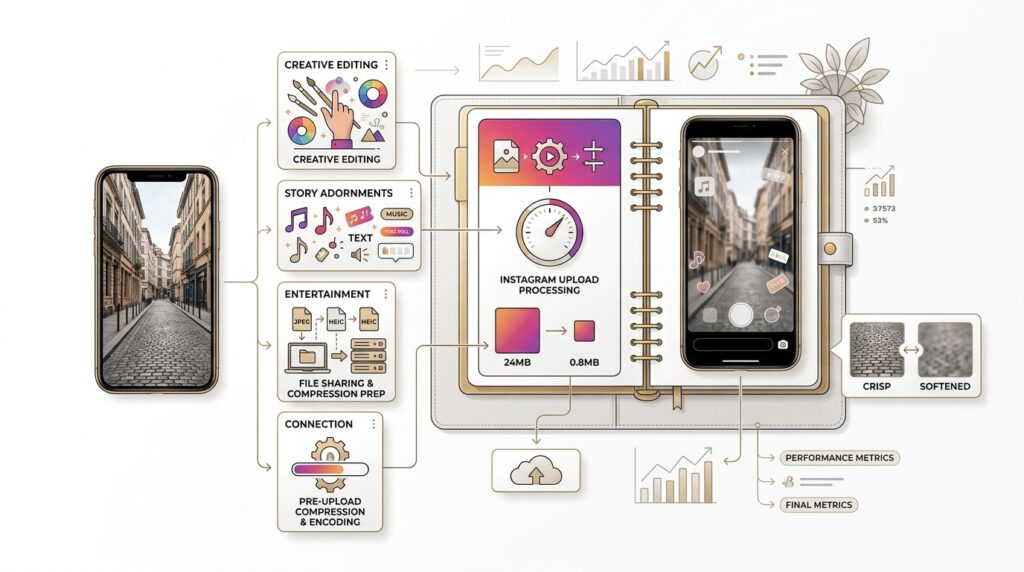
For example, sending a video through a messaging app, downloading it from another social platform, or exporting it several times can reduce its resolution or bitrate. Uploading that already-compressed version gives Instagram less detail to work with.
For the best starting point, upload the original file from your camera roll whenever possible.
A simple workflow is:
Camera → Edit once → Export → Instagram
rather than:
Camera → Messaging app → Download → Edit → Re-export → Instagram
Every unnecessary processing step can make fine details, text, and edges harder to preserve.
Why Does My Story Get Blurry After Adding Music or Stickers?
Some Stories look sharp before publishing but lose clarity after adding music, GIFs, stickers, filters, or other interactive elements.
These additions can require Instagram to process the Story again before publishing. That does not mean every sticker or music track will automatically make a Story blurry, but a noticeable quality change after adding elements is a useful clue.
If this happens, compare two versions:
Version A: Original media with minimal edits
Version B: The same media with music, stickers, filters, and other effects
If Version B consistently looks softer after publishing, simplify the Story where possible and start with a properly exported 1080 × 1920 file.
What If Only Text Looks Blurry?
Sometimes the photo itself is fine, but small text, thin lines, and detailed graphics look soft.
This is especially common with screenshots, Canva-style designs, logos, and graphics containing lots of small elements. Compression can remove fine details more noticeably than large shapes or faces.
To make text easier to preserve:
-
Use a larger font size.
-
Avoid extremely thin fonts.
-
Use strong contrast between text and background.
-
Keep important text away from heavily detailed backgrounds.
-
Export graphics at 1080 × 1920 instead of enlarging a smaller image.
The goal is not to prevent Instagram from processing the Story. You cannot completely disable that processing. The goal is to give Instagram a clean source file that can survive the conversion with as much detail as possible.
A Quick Blurry Story Diagnosis
Use this simple rule:
Blurry in your camera roll → Fix the original file
Sharp in your camera roll but blurry after upload → Check Instagram settings and upload conditions
Sharp until music or effects are added → Simplify the Story and compare again
Only text or graphics look blurry → Improve the design and export quality
Old Story is blurry but the original is gone → You may not be able to recover the lost detail
Once you know where the quality drops, fixing the problem becomes much easier.
A Concise Summary Table for Instagram Story Clarity Tips
| Issue | Cause | Solution | Tip |
| Blurry stories | Instagram compression | Use images <30MB, videos <4GB, upload via Wi-Fi | Avoid large files |
| Blurry stories | Low-end device/camera | Use phone’s native camera | Older devices may reduce clarity |
| Blurry stories | Instagram camera | Shoot with native camera, then edit in app | In-app camera compresses files |
| Blurry stories | App settings | Turn off Data Saver, enable Upload at Highest Quality | Keep app updated |
| 4K video blurry | Instagram downsizes to 1080p | Export with proper resolution and bitrate | Use HDR & good lighting |
| Upload issues | Weak network or bugs | Use stable internet, upload clean version first, reinstall app if needed | See How to Fix Instagram Update Bug in 2026 |
Summary
Crystal-clear stories aren’t just luck; they’re strategy. Armed with the right tips, you can keep every pixel sharp and every moment unforgettable. Embrace these easy fixes to avoid blurry Instagram stories and turn every upload into something eye-catching and vibrant.
Still asking why my Instagram Story looks blurry and want them to shine? Which of these tips are you excited to try first? What’s your go-to trick for capturing sharp, vibrant Stories? Share your secrets!
How to fix Instagram stories with poor clarity?
Improving connection and upload settings helps.
How to put a high-quality story on Instagram?
Using the native camera, correct dimensions (1080*920) usually improve story quality.
Why have my stories gone blurry?
Stories can become blurry due to Instagram’s file compression algorithm or improper file resolution.
How do I stop Instagram from changing story quality?
Disabling low data mode and turning on “upload at highest quality” reduces automatic compression.
Why is my 4K video blurry on Instagram Story?
Instagram downscales 4K videos to 1080p and compresses them, causing loss of sharpness.