If you don’t take a moment to learn what the best ways are to hide your Instagram story from everyone, you might end up sharing more than you intended. Not customizing your story visibility can lead to uncomfortable situations, oversharing, and a lack of control over who sees your personal moments.
In this guide, we will show you how to solve this issue, so you can post with peace of mind and decide who gets a glimpse of your Stories.
If you want to save Instagram content for offline viewing or easier sharing, our ucmini Instagram downloader tools help you save your favorite content with just a few simple clicks.
How to Make Your Instagram Stories Invisible to Everyone in 2026? (4 Top Methods)
Sometimes, you don’t want every follower peeking into your daily updates, and that’s perfectly fine. There are effective ways to hide your Instagram story from all followers, allowing you to manage your online presence strategically.
By customizing who can see your content, you can experiment with different audiences, test what resonates, or simply keep certain moments out of view, all without disrupting your main feed or interactions.
1. Hide Instagram Story from Multiple Users Before Posting
You don’t have to share every story with everyone; in fact, knowing the best ways to keep your Instagram story private from everyone helps you curate your followers’ access.
By tweaking your privacy settings before you post, you can make sure your stories reach only the people you want, keeping your content personal, private, and perfectly crafted.
But consider that by the help of highlight your followers understand that they hid and they cannot see the highlights.
Here’s how to set it up step by step:
- Open Instagram: Launch the app and swipe from your home feed to open the Instagram story creation screen. Alternatively, you can tap the Create button to start a new story.
- Access Story Settings: On the story creation screen, tap the gear icon at the top-left corner to open the settings menu.
- Navigate to Privacy Settings: Next, go to Settings > Privacy > Story. This section lets you control Instagram story visibility and determine who can access your stories.
- Select “Hide Story From”: Tap on the “Hide story from” option to display a list of all your followers.
- Choose Users: Scroll through the list or use the search bar to find specific users from whom you want to hide your story. Once you’ve selected the appropriate followers, tap Done (on iPhone) or the back button (on Android) to save your settings. And just like that, the story disappears from their view, silently and instantly.
2. Hide Instagram Story from Someone After Posting
Everything is under control if you’ve already posted a story but realized you want to exclude someone from seeing it. You can hide a story from specific people even after it’s live. Here’s how to control Instagram story visibility retroactively:
- Go to the profile of the person from whom you want to hide your Instagram story.
- Tap the three dots in the top-right corner of their profile.
- From the menu that appears, select Hide Your Story.
- This will instantly prevent the selected person from viewing your current story.
Read more: Sometimes, when you tap on an Instagram Story, instead of seeing the content, you get the message “This Story Is Unavailable” and you don’t know what happened. If you’re curious to know exact data our article will show you all the details and solutions.
3. Use the Instagram Restrict Feature
Sometimes, hiding your story isn’t the only or best way to manage your privacy on Instagram. If you’re looking for a subtler ability to dictate story access, Instagram offers powerful tools beyond the basic story settings.
In fact, using features like Restrict is one of the best ways to hide your Instagram story from everyone or limit visibility for certain followers without them knowing. Restricting someone limits their interactions with your posts and stories quietly; they won’t be able to see when you’re online or when you’ve read their messages.
- Go to the person’s profile.
- Tap on the three dots (⋯) and choose Restrict.
4. Utilizing the Instagram Close Friends Feature
If you want to hide your Instagram story from everyone but one person, Instagram’s Close Friends feature is the easiest and most private way to do it. In fact, it’s one of the smart ways to control who sees your Instagram story. Instead of manually hiding your story from every follower, you can simply share it with a select few, or even just one special person.
This feature ensures that only people you’ve personally added to your Close Friends list can view your stories, giving you full command of your followers’ reach. It’s perfect for sharing personal moments, testing content, or keeping things low-key without broadcasting to your entire audience list.
- When posting a story, tap on the “Close Friends” button.
- Select the one person (or small group) you want to include on your Close Friends list.
- Post your story, and it will be hidden from everyone else automatically.
Essential Keys About Top Ways to Hide Your Instagram Story
Instagram privacy settings give you more control than you might think. But before you flip the switch, here are a few quick things to remember. Let’s break it down so you know exactly what happens when you choose one of the best ways to hide your Instagram story from everyone.
- Hiding Doesn’t Block the Person: Hiding your Instagram story from someone doesn’t mean you’re blocking them. They can still visit your profile, like your posts, and comment on your pictures. This feature only applies to stories, not to your main feed.
- No Notifications for Them: Instagram won’t notify the person when you limit who can see your story. They’ll simply notice that your story is unavailable, but they won’t receive an alert or be informed that you’ve made this change.
- Unhiding Your Story: If you ever change your mind and want to allow the person to view your future stories, return to their profile, tap the three dots again, and select Unhide Your Story. This allows them to see your stories once more.
Read more: If you want to get the most out of your posts, stories, and interactions and avoid unintentionally encountering Instagram limits 2026, it’s essential to know Instagram’s rules and restricts such as how many likes, follows, or comments are allowed per day
Which Instagram Story Privacy Option Should You Use?
Instagram gives you several ways to control who can see your Stories, but they are not interchangeable. The best option depends on whether you want to exclude a few people, share with a small group, or keep the Story completely private.
Choosing the right setting can also save you from manually changing your privacy list every time you post.
Hide Story From vs. Close Friends
These two options work in opposite ways.
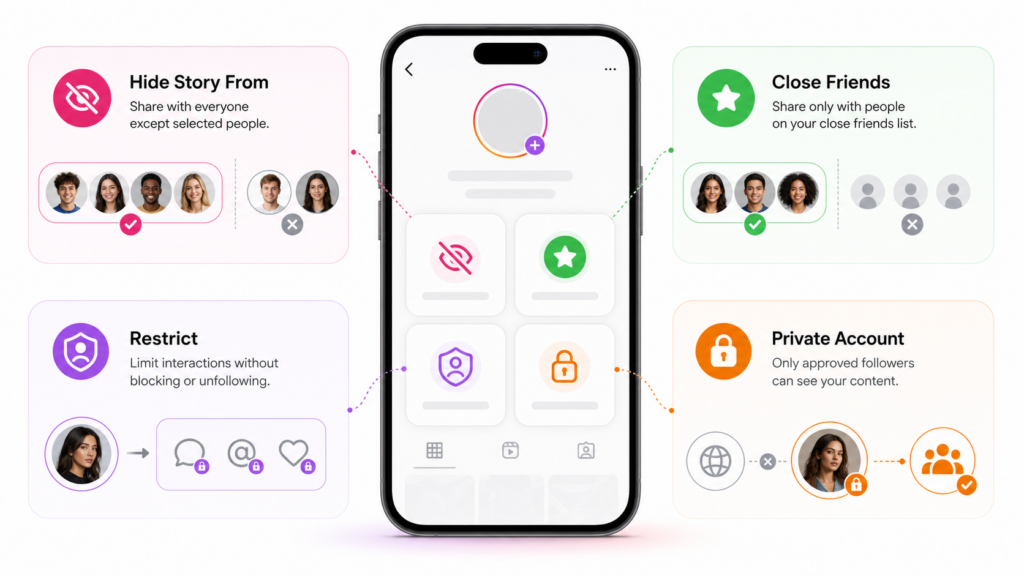
Hide Story From is best when you want most people to see your Stories but need to exclude specific accounts. You choose the people you don’t want to see your Stories, while everyone else can continue viewing them.
Close Friends is better when you want to share a Story with only a small, trusted group. Instead of excluding dozens or hundreds of people, you create a list of people who are allowed to see that particular Story.
A simple rule is:
Small number to exclude → Hide Story From
Small number to include → Close Friends
What If You Want Nobody to See Your Story?
If you genuinely want nobody to see a Story, the simplest solution is not to publish it.
Instagram’s Hide Story From setting is designed to exclude selected accounts. You can select a large number of people, but manually hiding a Story from every follower is inconvenient and can become difficult to manage, especially on a large account.
If you want to create a Story now but do not want anyone to see it, consider saving the content to your device or using Instagram’s archive options instead of publishing it publicly.
Does Hiding Your Story Also Hide Your Highlights?
This is an important distinction.
Stories and Highlights are related, but they are not exactly the same thing. A privacy change that prevents someone from seeing your Stories should not be treated as a universal privacy setting for every piece of content saved to your profile.
If you have sensitive or personal Highlights, review their visibility separately before assuming that hiding a person from your Stories has automatically hidden everything they could previously access.
This is especially important if you are using Stories to create Highlights later. Check the audience before adding sensitive content to a Highlight.
Don’t Confuse Restrict With Story Hiding
Restrict is useful for limiting someone’s interactions with your account, but it is not a replacement for the Hide Story From feature.
If your specific goal is to stop someone from seeing your Story, use the Story privacy controls rather than Restrict.
Use Hide Story From when the problem is Story visibility.
Use Restrict when the problem is unwanted interactions, comments, or messages.
The Quick Decision Guide
| Your Goal | Best Option |
|---|---|
| Hide Stories from a few specific people | Hide Story From |
| Share a Story with only selected people | Close Friends |
| Prevent everyone from seeing a Story | Don’t publish it |
| Limit someone’s interactions with you | Restrict |
| Keep your whole account visible only to approved followers | Private Account |
The key is to choose the setting based on your actual goal. You don’t need to block someone just because you don’t want them seeing your Stories, and you don’t need to manually hide your Story from hundreds of people when Close Friends can do the job more efficiently.
End Notes
Figuring out the best ways to hide your Instagram story from everyone doesn’t have to be complicated. Whether you’re setting healthy boundaries, keeping things private, or curating your audience, these tools give you the power.
So, before you hit that “Post” button, take a second to tweak your settings. It’s a small step that makes a big difference in keeping your Instagram space truly yours. What about you? Have you ever felt the need to manage story visibility for select followers? Share your thoughts below about the ways you limit story access to chosen people.
Is there a way to hide your Instagram story from everyone?
Yes, by using the “Hide Story From” option in Story Privacy settings.
How to hide everyone from Instagram stories at once in 2026?
You can manually select all followers under “Hide Story From.”
How to only show stories to one person?
Use the Close Friends feature, add that single person, and your story becomes a private message that still feels like a post.
Do people know if you Limit access to your Instagram story?
No, Instagram doesn’t notify them.
How to Block viewers from your Instagram story from everyone but one person?
Either restrict story visibility from the whole crowd except that one lucky viewer, or use Close Friends to make them your exclusive audience.